

The core guarantee
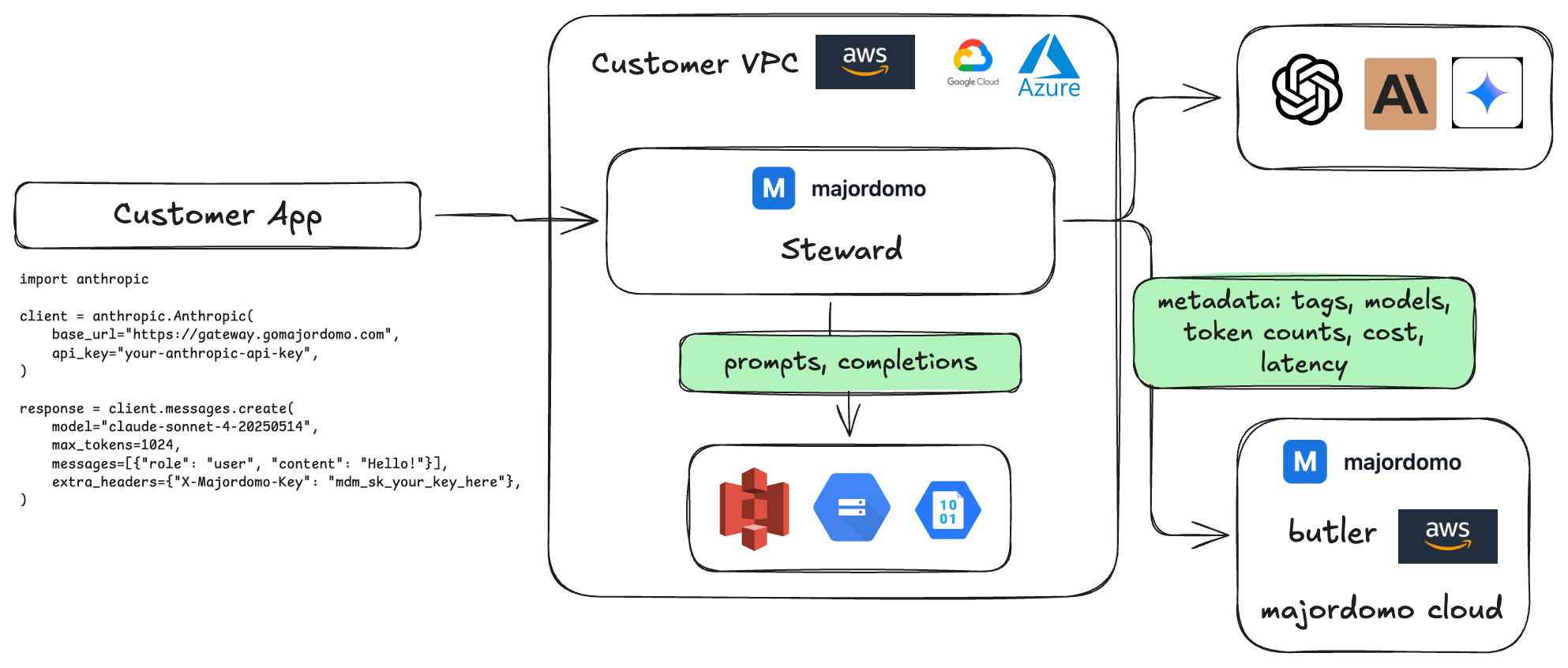
When you run Steward in your own infrastructure:- Prompt content never leaves your environment. Steward runs inside your VPC, processes your LLM requests locally, and writes full request/response bodies to your own S3 or GCS bucket.
- Majordomo’s servers never receive prompt content. The only data that flows outbound to Majordomo is request metadata: model name, token counts, cost, latency, and any custom tags you configure. No inputs, no outputs, no conversation history.
- You own the storage. Bodies go to a bucket in your AWS account or GCP project. You control the encryption keys, the retention policy, and who has access.
Data flow diagram
Security questionnaire answers
The answers below are written from your perspective, for use in your own vendor questionnaires. Adapt them to match your specific infrastructure and policies before submitting.Where is your AI/LLM data processed? In our own infrastructure. We run the Majordomo Steward gateway inside our VPC. All LLM requests are processed locally; the gateway proxies requests directly to provider APIs (OpenAI, Anthropic, etc.) without routing through any third-party intermediary.
Whose provider credentials are used? Ours, by default. Each Majordomo API key has a credential mode, and every key defaults to
byok, meaning requests authenticate with the provider keys we have stored ourselves.
Majordomo can optionally supply provider credentials for open-weight models, which is enabled per API key by setting that key to majordomo or prefer_own. It changes only which credential authenticates the upstream call: the request still goes directly from the gateway to the provider, and prompts are not routed through any additional party. Requests record which side’s credential was used, so this is auditable after the fact. See Provider Routing.
Where is conversation data stored? In our own cloud storage. Full request and response bodies are written to an S3 bucket in our AWS account (or GCS bucket in our GCP project). We control the bucket, the encryption keys, and the retention policy.
Does your LLM observability vendor receive prompt data? No. We use Majordomo for usage metrics and cost tracking. Steward runs in our infrastructure and transmits only metadata to Majordomo’s servers: model names, token counts, costs, and latency. Prompt content and response content never leave our environment.
What data does your AI vendor have access to? Majordomo has access to request metadata only: which models we call, how many tokens we use, and what it costs. No prompt content, no response content, no user data.
Is PII processed by third-party AI infrastructure vendors? No PII is transmitted to Majordomo. Steward runs inside our own VPC and sends only non-content metadata outbound. Any PII that might appear in prompts is processed locally and written to storage we control. It never reaches Majordomo’s servers.
How is AI usage data encrypted in transit? Metadata transmitted to Majordomo is sent over TLS 1.2+. Request/response bodies stored in our S3/GCS bucket use AES-256 encryption at rest with our own CMK.
Can you provide a data flow diagram? Yes. See the diagram in the architecture section of our security documentation. The short version: user requests → our gateway (our VPC) → provider API. Bodies → our S3. Metadata only → Majordomo.
Does Majordomo have a SOC 2 report? Contact security@gomajordomo.com for current compliance documentation.
What to share with your security team
If your security team needs to review the architecture, point them here:- This page: the technical architecture and data flow
- How It Works: the full technical explainer
- Network egress rules: Steward’s only outbound destinations are your LLM providers, your own S3/GCS bucket, and Majordomo’s metadata ingest endpoint (see the checklist below), so its behavior is verifiable at the network layer
Deployment
See Steward Setup for a complete walkthrough of deploying Steward in your VPC with Docker, Postgres, and optional S3/GCS body storage.Body storage configuration
Body storage is configured in the dashboard (Settings → Cloud Body Storage), not in Steward config. Connect your S3 or GCS bucket once, and Steward will write gzipped request/response bodies to it automatically. Majordomo’s database contains only metadata: token counts, cost, latency, model name, and your custom tags. See Cloud Body Storage for setup instructions.Checklist for enterprise reviews
Before a vendor security review, confirm:- Steward is deployed inside your VPC (not using Managed deployment)
- Body storage is configured to your own S3/GCS bucket (or disabled if you don’t need it)
- No
X-Majordomo-User-Idor similar tags contain PII; use opaque identifiers - Network egress from Steward is restricted to: LLM provider endpoints, your S3/GCS bucket, Majordomo metadata ingest endpoint
- Postgres is not publicly accessible
- You have a documented retention policy for the
llm_requeststable and your body storage bucket